Which companies did ChatGPT send to your site?
Most visits from AI assistants arrive with no label, so analytics files them as Direct. We match each visit to a company, show the question it came from, and score how close that company is to buying.
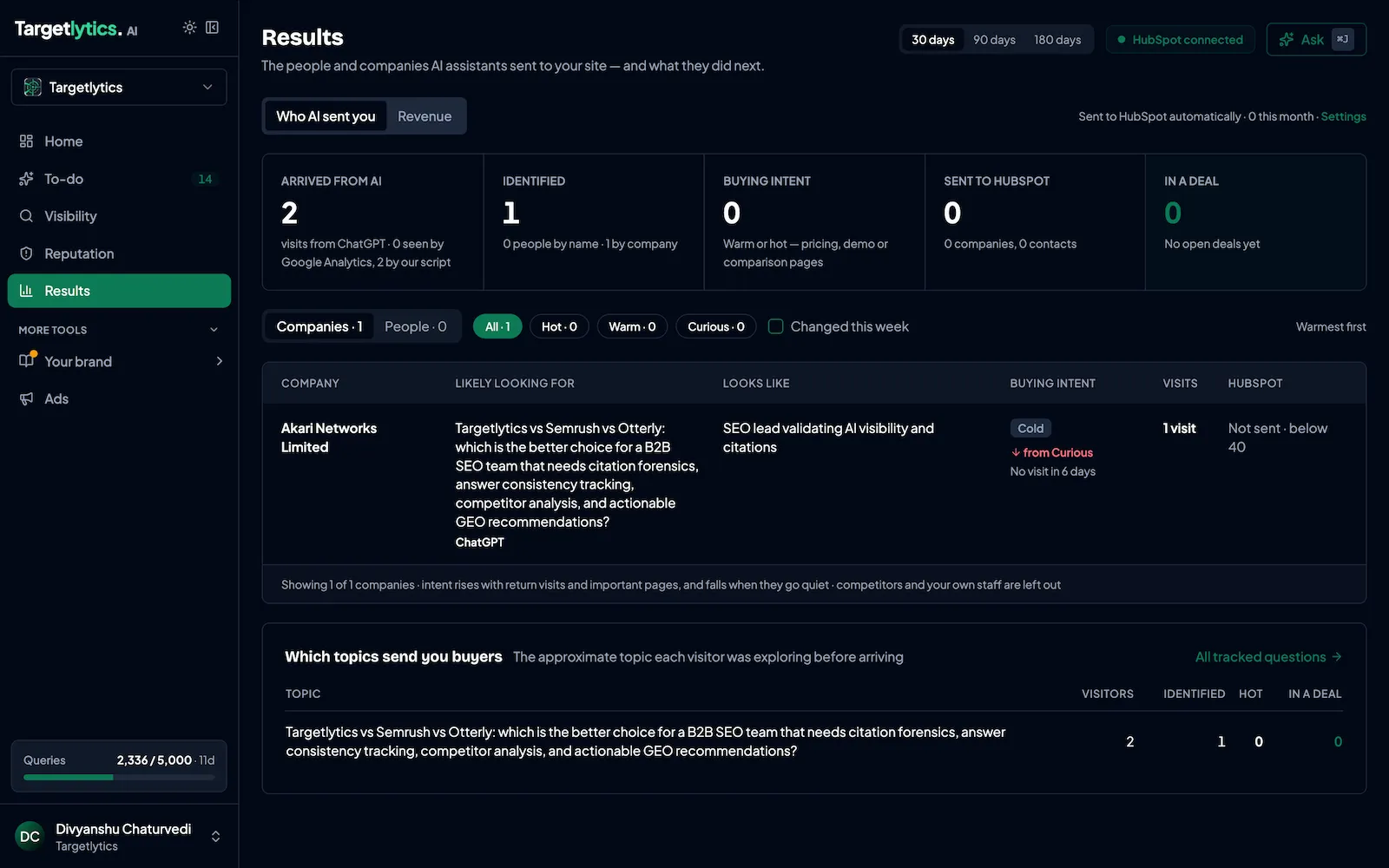
- 1The company behind the visit, or the person in the US with consent
- 2What they were looking for, from the question they asked AI
- 3How ready they are to buy: cold, warm or hot
What you do with it
- Send warm companies to HubSpot so sales can follow up the same day
- Open the question each company asked AI before you call them
- Watch for companies that come back to pricing, demo or contact pages
What it can't do
- Company names work worldwide. Individual people are shown in the US only, never for EU or UK visitors.
- VPNs, home internet and mobile networks often can't be matched to a company.
- Very small companies are matched less reliably than large ones.
- A visit we can't match with confidence is shown as unidentified. We don't fill gaps with guesses.
- Matching gets better when a company comes back, because there's more to go on.
What you see for each company
The company name, website and size, from licensed business data. The AI assistant and question that sent them, and the page of yours it quoted. The pages they read, in order, and how long they stayed. A buying-intent score that rises when they visit pricing, demo or contact pages, and when they come back. If your CRM is connected, whether they look like the buyers you've actually won.
How we know a visit came from AI
We check four things, most reliable first. The referrer, when the assistant passes it. Campaign tags, when present. The landing page: we already know which of your pages each assistant quotes for which questions, so an arrival on one of those pages tells us both the source and the question. And session signals, which keep a visit together and spot a return.
The third check is why this works even when the browser hides where a visit came from. It works because we already know which pages AI quoted, so we can match a visit to its question.
Setting it up
Install one tracking script; there is no build step. Connect Google Search Console and GA4. Connect your CRM so buyer types come from deals you've won. Then add your average deal value and close rate, so revenue numbers use your own figures.
The script only follows visitors who first came from an AI assistant. It sets a first-party cookie (_tl_vid) to recognise them when they return. For EU and UK visitors, install it with data-consent="required" and call targetlytics.grantConsent() from your consent manager. Without consent, the AI visit is still counted, but no cookie is set and no one is identified. Browser privacy signals (Global Privacy Control, Do Not Track) are respected automatically.
Frequently Asked Questions
Questions about visitor identification
In the EU and UK we identify companies, not people. The tracking cookie needs consent there: set data-consent="required" and the script waits for it. Without consent, AI visits are still counted anonymously.
Ultimate, and the Agency plan per client workspace.
HubSpot today. Pipedrive, Attio and Zoho are coming soon.
See who AI is sending you
Visitor identification is part of the Ultimate plan, with a 14-day free trial.
Free AI visibility audit
Find out what ChatGPT tells your buyers about you.
Where you're named, what AI gets wrong, and the first three things to fix. Emailed within two hours.
- Within 2 hours
- No credit card needed
- Free